Signing in and out
Password or magic link, what happens on each, and how to sign out.
The sign-in page offers two ways in. Both land you in the same place — pick whichever you prefer.
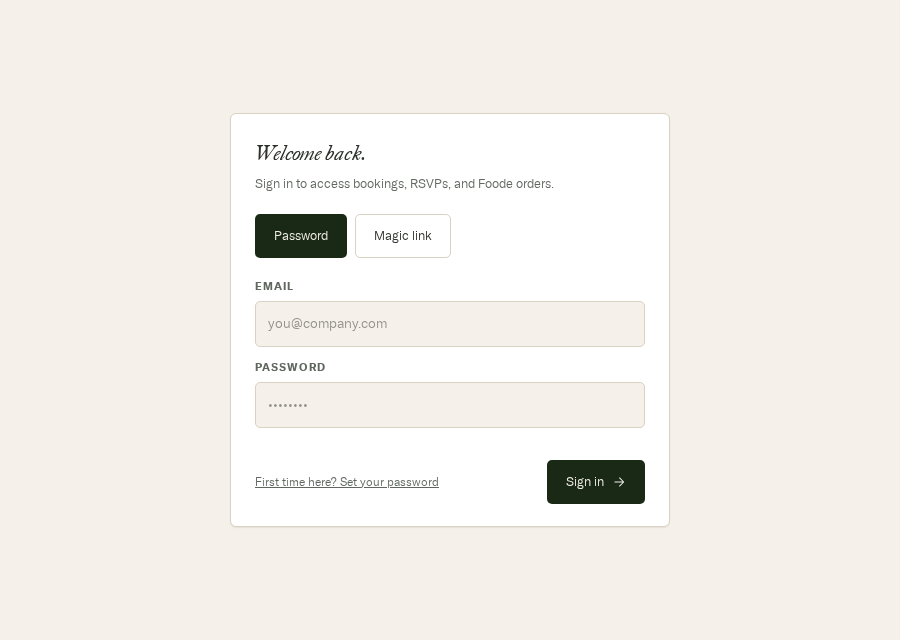
- Password or Magic link. Magic link emails you a one-tap sign-in instead of asking for a password.
- Your work email — the address your company uses here.
- Your password. On the Magic link tab this field disappears.
- Never set a password, or came from the old portal? Start here.
- Signs you in and returns you to wherever you were headed.
Magic link
Switch to the Magic link tab, enter your email, and submit. The portal mails you a link that signs you in when you open it — no password needed. Useful if you've forgotten yours and don't want to reset it right now.
Being sent to sign-in unexpectedly
Some pages need a session. If you open one while signed out, the portal remembers where you were going, sends you to sign in, and drops you back there afterwards. The pages that do this are Bookings, Events, Leave a comment, and anything under Admin. The dashboard and the calendar stay open to everyone.
Signing out
When you're signed in, the top-right of every page shows your name and a Sign out button. Click it and you're returned to the sign-in page with the session ended.